 Vox Stella
What The Election Tool Does
The current Election modal runs a streamed scan over a chosen date range and location.
It can:
- scan for a supported election model
- rank the top candidate times
- show a short pros and cautions summary for each result
- jump a chosen result back into Astro Clock
- export the current top list as CSV
Screen At A Glance
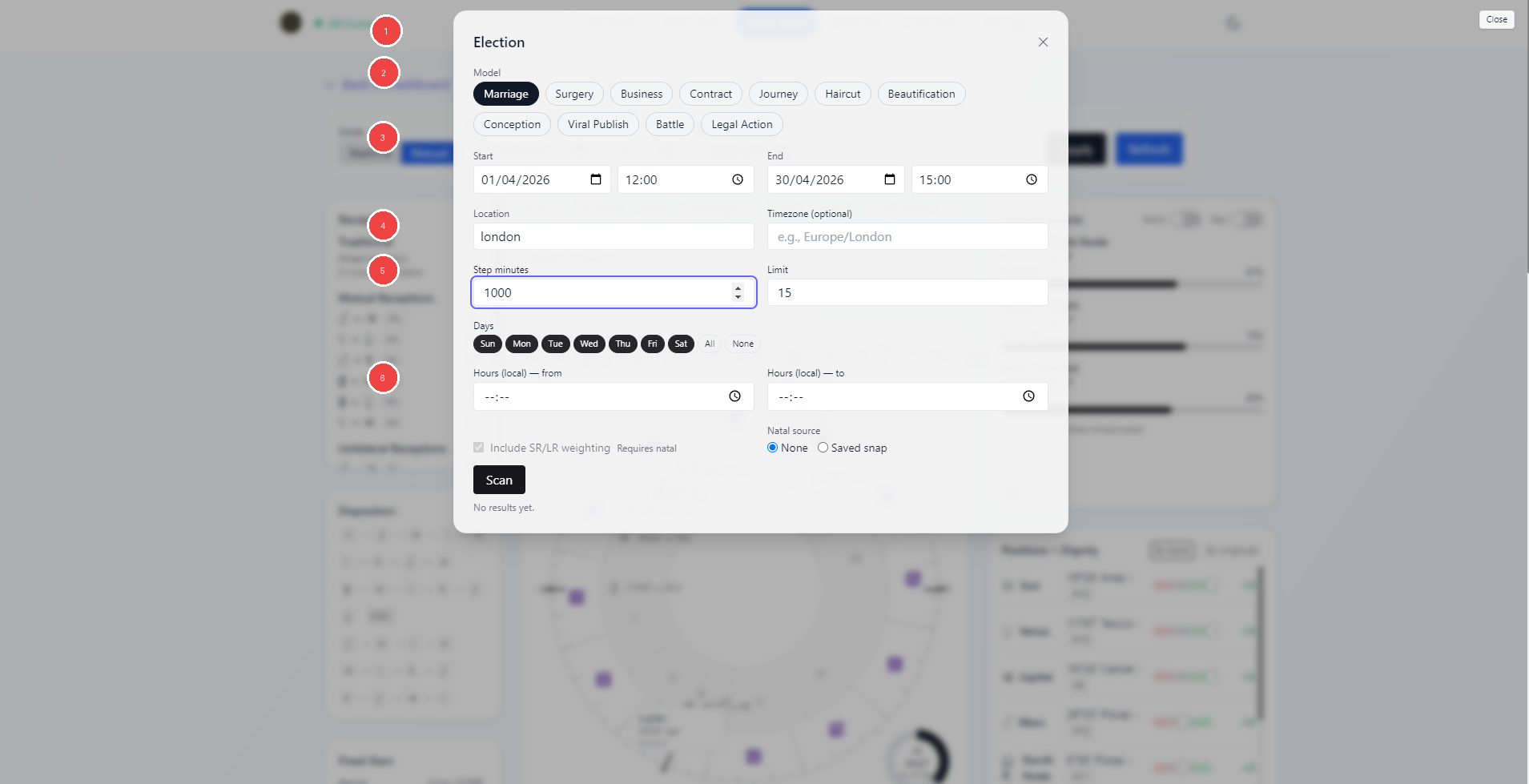
- Election title and close control
- Model picker
- Date, time, and location range inputs
- Scan step and result limit controls
- Day and hour filters
- Natal source and scan actions
Available Models
The current UI supports these election models:
- Marriage
- Surgery
- Business
- Estate
- Contract
- Journey
- Haircut
- Beautification
- Conception
- Lunar Fertility Windows
- Viral Publish
- Battle
- Legal Action
The shared scan workflow stays the same, but the middle controls change with the chosen model.
Shared Scan Controls
Every model uses the same base inputs:
- start date and time
- end date and time
- location
- optional time zone
- step minutes
- result limit
- allowed weekdays
- local hour range
These inputs define the scan window and how densely the scan moves through it.
Natal Source
Election can work in two modes:
NoneSaved snap
When a saved snap is selected, the modal can pass that natal context into the election engine.
This matters because some election models support natal overlay features such as:
- natal promise checks
- return or direction weighting
- SR or LR weighting
The Include SR/LR weighting toggle is only available when a natal saved snap is active.
Natal overlay remains optional in the shared Election workflow. Specialized participant-relative models still require the saved charts that define their calculation: Marriage Beta uses two participant snaps, Business Beta at least one, Estate one, and Lunar Fertility Windows a natal phase anchor.
Model-Specific Options
Different models add different controls.
Examples from the current UI include:
Marriage: Alpha or line-aware Beta; Beta adds two participant snaps and period extractionSurgery: procedure type, body part, lunation screen, fixed-star screeningBusiness: Alpha business options or line-aware Beta participant/extraction controlsEstate: buy or sell, participant snap, and line-aware period extractionContract: context, fixed Asc preference, Saturn binding option, Mercury-direct delay, fixed starsJourney: long or short journey and optional fixed-star screeningBattle: action focus, traditional timing, fixed-star screeningHaircut: trim or complete shave, plus balanced, growth, or longer-lasting focusBeautification: procedure type, body parts, sign overrides, timing and fixed-star togglesConception: fertility guidance, optional sex focus, timing and fixed-star togglesLunar Fertility Windows: phase/antiphase mode and a visual inspection levelViral Publish: natal overlay, timing, and fixed-star togglesLegal Action: filing, response, or counter-filing, plus timing and fixed-star toggles
This is why the Election modal changes shape as you switch models.
Running A Scan
Click Scan after the required fields are filled in.
The modal opens a streamed scan and shows a progress bar while the scan is running.
The current frontend also validates obvious input issues before scanning, such as:
- missing start or end date and time
- end before start
- missing location
- invalid local hour range
Reading Results
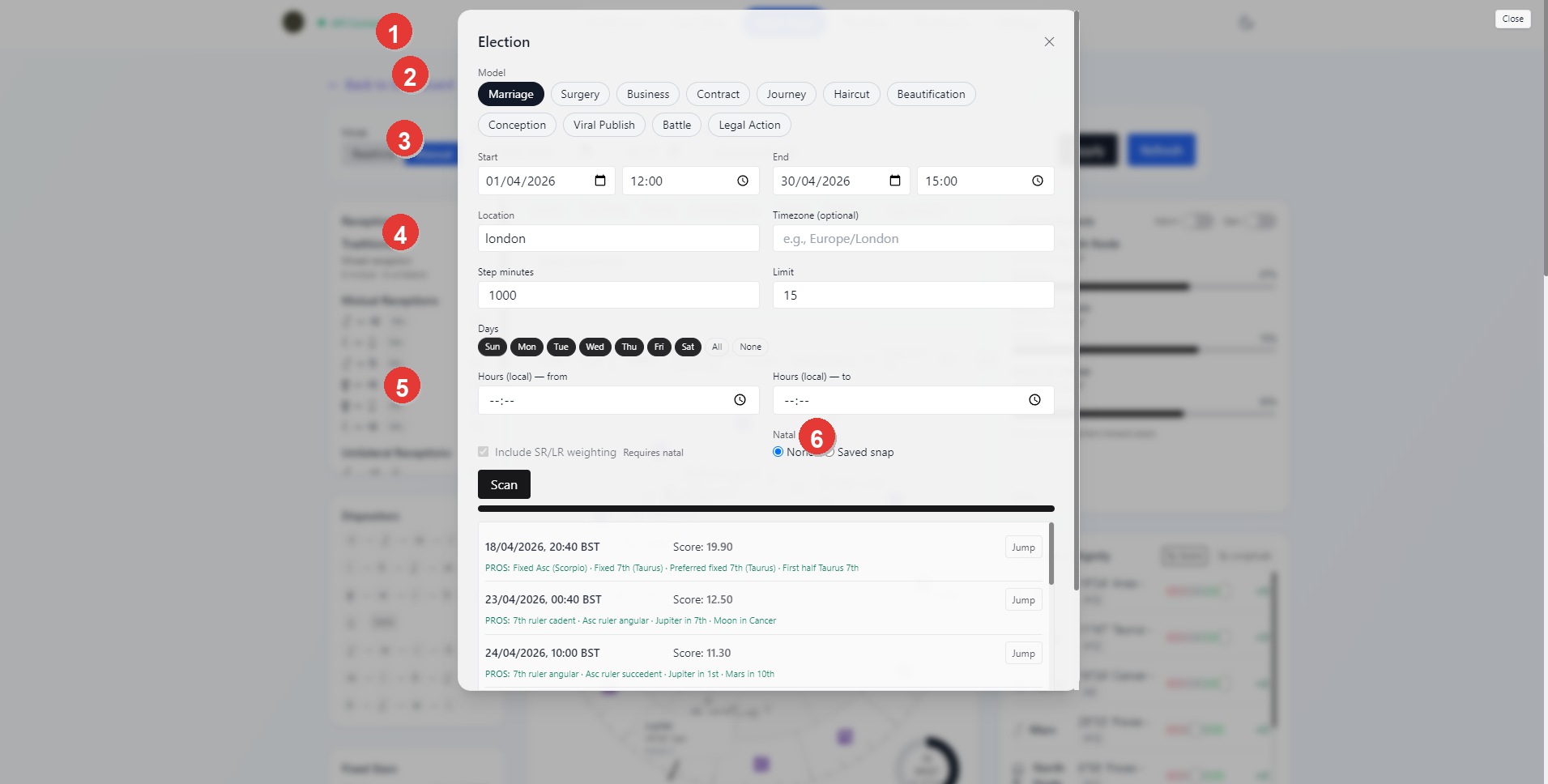
- Election title and active modal
- Active model row
- Shared range and location controls
- Scan tuning fields
- Top ranked result rows
Jumpaction for a selected result
Each result row shows:
- the candidate local timestamp
- the score
- a short
PROSsummary - a short
CAUTIONSsummary when present - a
Jumpbutton
The score ranks candidates within the selected model and scan. It is not a shared percentage scale, so scores from different models are not comparable. The metadata panel identifies the model version, source profile, scan mode, and whether optional natal context was applied.
The result list is meant to help you compare the short-ranked candidates quickly before loading one back into the main Astro Clock workspace.
Jumping Back Into Astro Clock
Jump pushes the selected election timestamp back into Astro Clock.
The current flow prefers:
- the streamed result timestamp
- the current election location
- the resolved or explicit time zone
This is the fastest way to turn a promising election result into the active Astro Clock chart for deeper inspection.
Exporting
When results exist, the modal exposes Download Top (CSV).
The export includes:
- timestamp
- score
- tags summary
This is a lightweight export of the current ranked result list, not a full narrative report. Line-aware models also expose their extracted periods in the results workflow.
Practical Workflow
For most users, the cleanest Election workflow is:
- choose the election model
- set the date range, location, and scan density
- narrow the days and local hours if needed
- add a saved natal snap when you want natal overlay behavior
- run the scan
- compare the top results
- use
Jumpto inspect the best candidates back in Astro Clock - export the top list if you want to keep the shortlist outside the modal
Notes
- Not every model requires a saved snap.
- A saved snap becomes important when you want natal promise or SR/LR style weighting.
- The result list is a ranked shortlist. Use
Jumpand the main Astro Clock workspace when you want to inspect a chosen candidate more fully. - Surgery, Conception, and Lunar Fertility are traditional symbolic timing
tools, not medical advice, fertility diagnosis, ovulation estimation, or fetal-sex prediction.
- Technical model and source details are recorded in
docs/ELECTION_MODEL_REFERENCE_2026-07-31.md.