
Before You Start
In Astro Clock, click Weather in the Places group of the Tools bar. Astrocartography, Mundane and Weather share one window with three tabs; close it with the close button or press Escape.
- Weather doesn't need a saved chart. You give it a place, or a region, and the dates.
- It has two modes: Scan, which opens first, and Analysis.
- Every result sits under one short notice: "Astrological reading, not a weather forecast." For safety decisions, use your national weather service.
Screen At A Glance
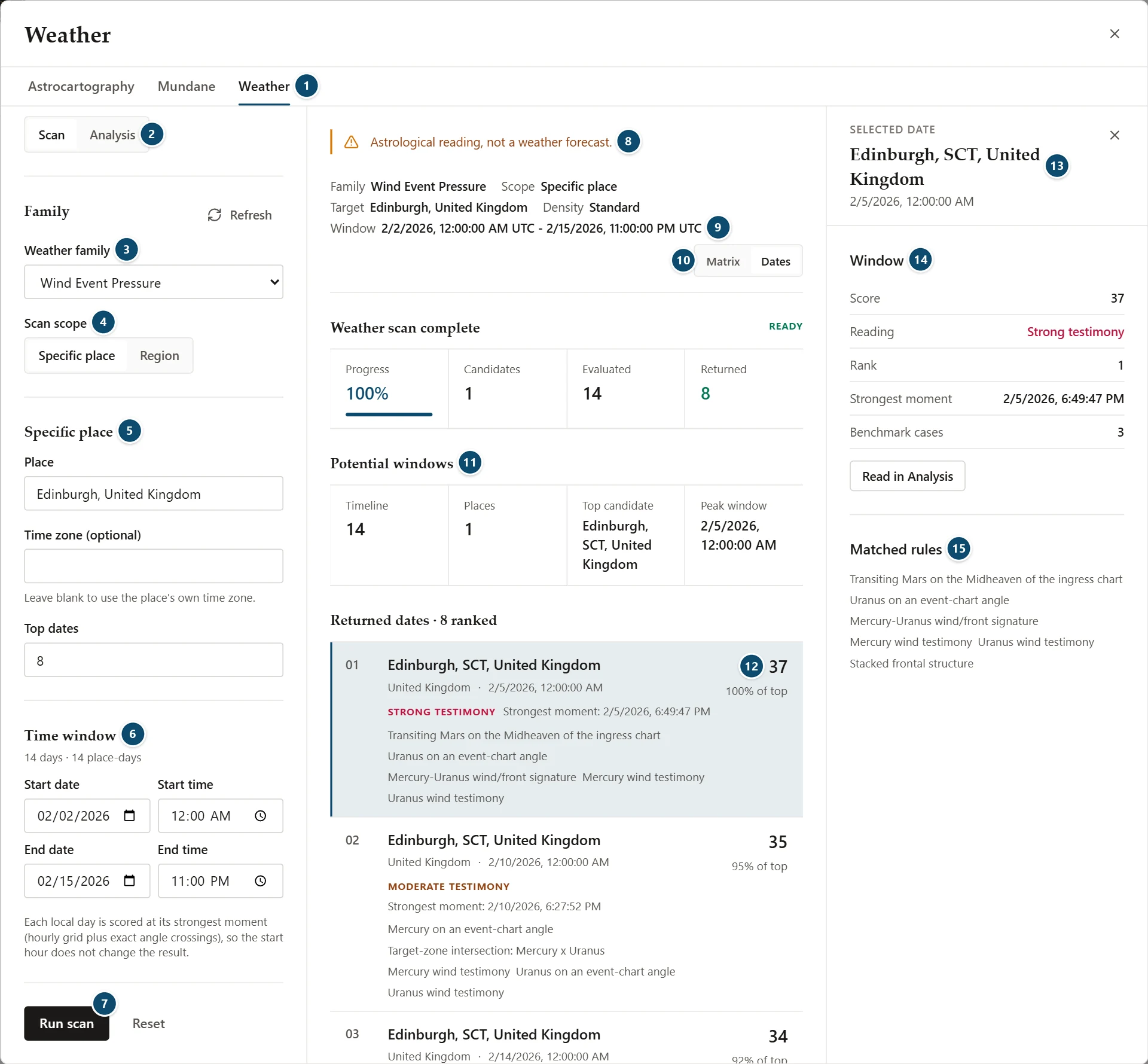
- Astrocartography, Mundane and Weather tabs
- Scan or Analysis
- Weather family
- Scan scope: Specific place or Region
- Specific place: the place, an optional time zone and the number of dates
- Time window, with the number of days
- Run scan
- The notice: "Astrological reading, not a weather forecast."
- Scan summary: family, scope, target, density and window
- Matrix or Dates
- Potential windows
- A returned date's score and share of the top score
- Side inspector for the selected date
- Window
- Matched rules
The window has three parts: the setup column on the left, the results in the middle, and a side inspector on the right that opens when you select a result. Close the inspector with its own close button, or click the selected result again.
Weather Families
Weather family sets the kind of signature the rules look for:
- Flood Risk
- Hurricane Pressure
- Severe Convective Pressure
- Wind Event Pressure
While a scan runs, the family is locked; cancel the scan to change it.
How The Charts Are Read
The rules follow Kris Brandt Riske's Predicting Weather Events with Astrology:
- Seasonal ingress and lunar phase: the latest cardinal ingress sets the season's background and the latest lunar phase sets the week. In those two charts, planets within 4° of the angles, and aspects whose planets touch the local angles, count. Every lunar phase has equal weight: a quarter Moon gets no bonus.
- Timing: fast planets (the Sun, Moon, Mercury, Venus and Mars) crossing the angles of the ingress or lunar-phase chart within 1° time the event, at full weight while they approach and half weight once past. The chart for the moment itself is read with the same 1° orb and counts for less.
- Mercury bridge: transiting Mercury within 1° of a conjunction, square or opposition to Mercury in the ingress or lunar-phase chart sharpens wind timing.
- Wind: Mercury, Mars, Uranus or Pluto on an angle or square the meridian.
- Floods: Venus, Saturn and Neptune together (Saturn–Neptune, Venus–Saturn, Venus–Neptune). The strongest flood readings need Neptune on or square the meridian, and the signature grows when it repeats over the last three lunar phases.
- Target zones: one planet on the horizon and another on the meridian at the same moment focus the weather on the place.
- Hurricane and flood readings also check that the place lies where such events occur.
Scanning One Place
With Scan scope set to Specific place:
- Place: the place to scan, such as a city and country
- Time zone (optional): leave it blank to use the place's own time zone, so each day runs from local midnight
- Top dates: how many dates to return
Under Time window, set the Start date, Start time, End date and End time. The panel shows how many days and place-days the scan covers. The window explains that each local day is scored at its strongest moment, on an hourly grid plus the exact times planets cross the angles, so the start hour doesn't change the result.
A scan covers at most 31 days; a longer window is refused with "Weather scan is limited to 31 days." Click Run scan, or Reset to clear the place and dates. While a scan runs, Cancel stops it.
Scanning A Region
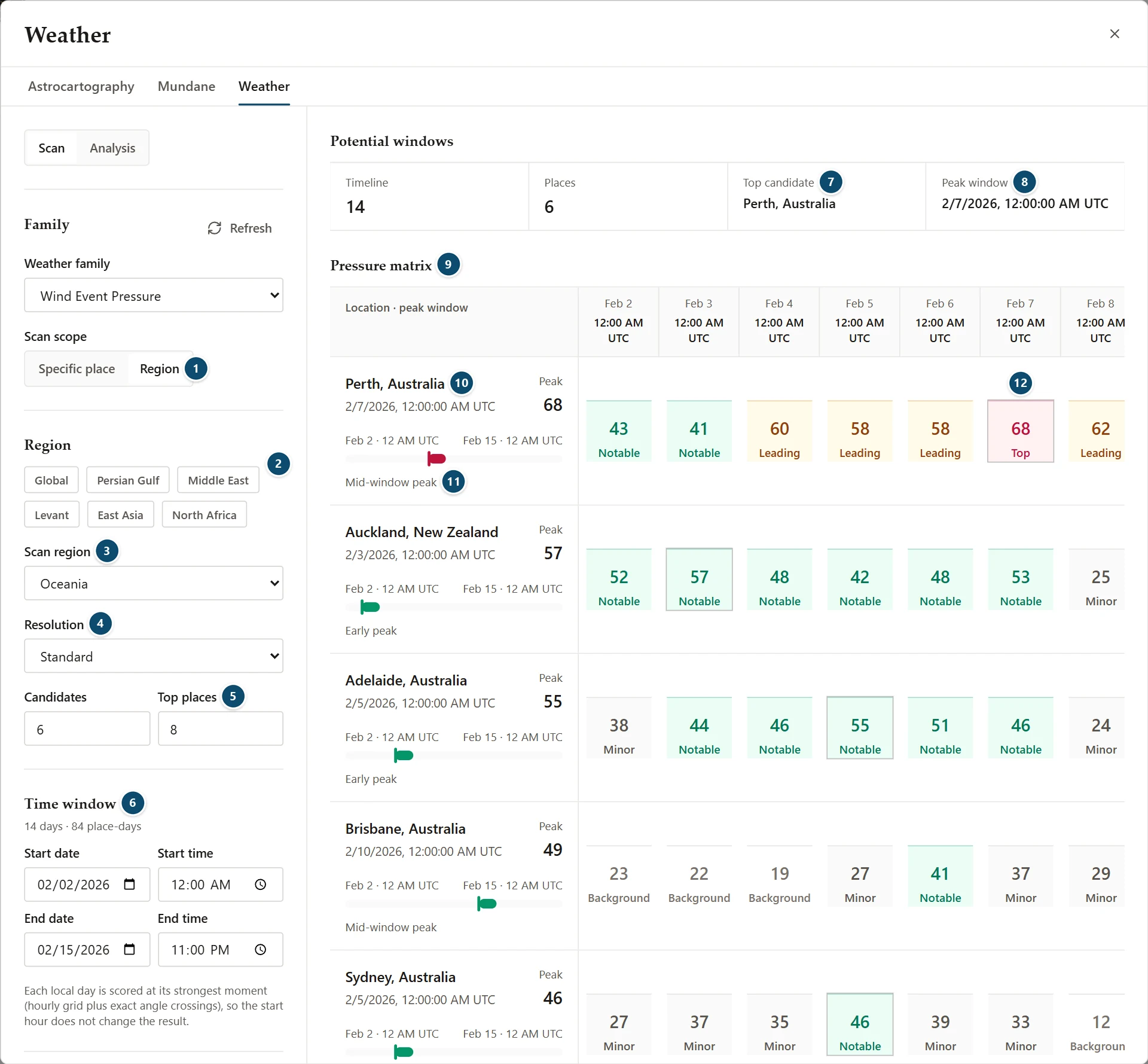
- Scan scope: Region
- Featured regions
- Scan region
- Resolution
- Candidates and Top places
- Time window, with the days and place-days
- Top candidate
- Peak window
- Pressure matrix
- A place, its peak window and peak score (places are listed highest peak first)
- Where the peak falls in the window, and its kind
- A day's score and scan level
With Scan scope set to Region:
- Featured region buttons, and Scan region for the full list, from Global to a continent or a smaller area
- Resolution: Coarse, Standard, Fine or Ultra
- Candidates: how many places in the region to score
- Top places
The days multiplied by the candidates give the place-days shown under Time window. A scan is limited to 186 of them; above that the window says "Weather scan is limited to 186 evaluated cells." Shorten the window or lower the candidates.
Reading Scan Results
A summary line above the results repeats the family, scope, target, density and window. Below it, a progress panel shows Progress, Candidates, Evaluated and Returned.
Potential windows sums up the scan: the number of days and places, the Top candidate and its Peak window. The top candidate is the place with the highest peak; when in the window the peak falls is shown, not penalised.
The results have two views:
- Matrix: the Pressure matrix, one row per place and one column per day
- Dates: the Returned dates, ranked
Matrix
Each place row shows its peak window and Peak score, a bar marking where the peak falls between the first and last day, and the kind of window: Early peak, Mid-window peak, Late peak, Sustained window or Quiet. Each day's cell shows its score and its scan level, such as Top, Leading, Notable or Minor.
Dates
Each returned date shows its rank, the place and country, the date, a reading such as Strong testimony, the strongest moment of that day, the matched rules, the score and its share of the top score.
The Side Inspector
Select a date to open Selected date:
- Window: Score, Reading, Rank, Strongest moment and Benchmark cases, with Read in Analysis
- Matched rules
Read in Analysis opens that strongest moment in Analysis, to the second, with the same place, coordinates and time zone, so the two readings match.
In Matrix, select a place to open Selected place, with its Peak score, Scan level, Kind, Peak shape, Timeline points and Benchmark cases.
About This Scan
Below the results, About this scan has two panels:
- Measured performance: how the method has done on documented events, for example how many peaked on the right day and the chance rate; the rules were set using these events. A note repeats how each day is sampled.
- Scan scope: the scope, resolution, candidates, days, evaluated cells and returned results
Analysis Mode
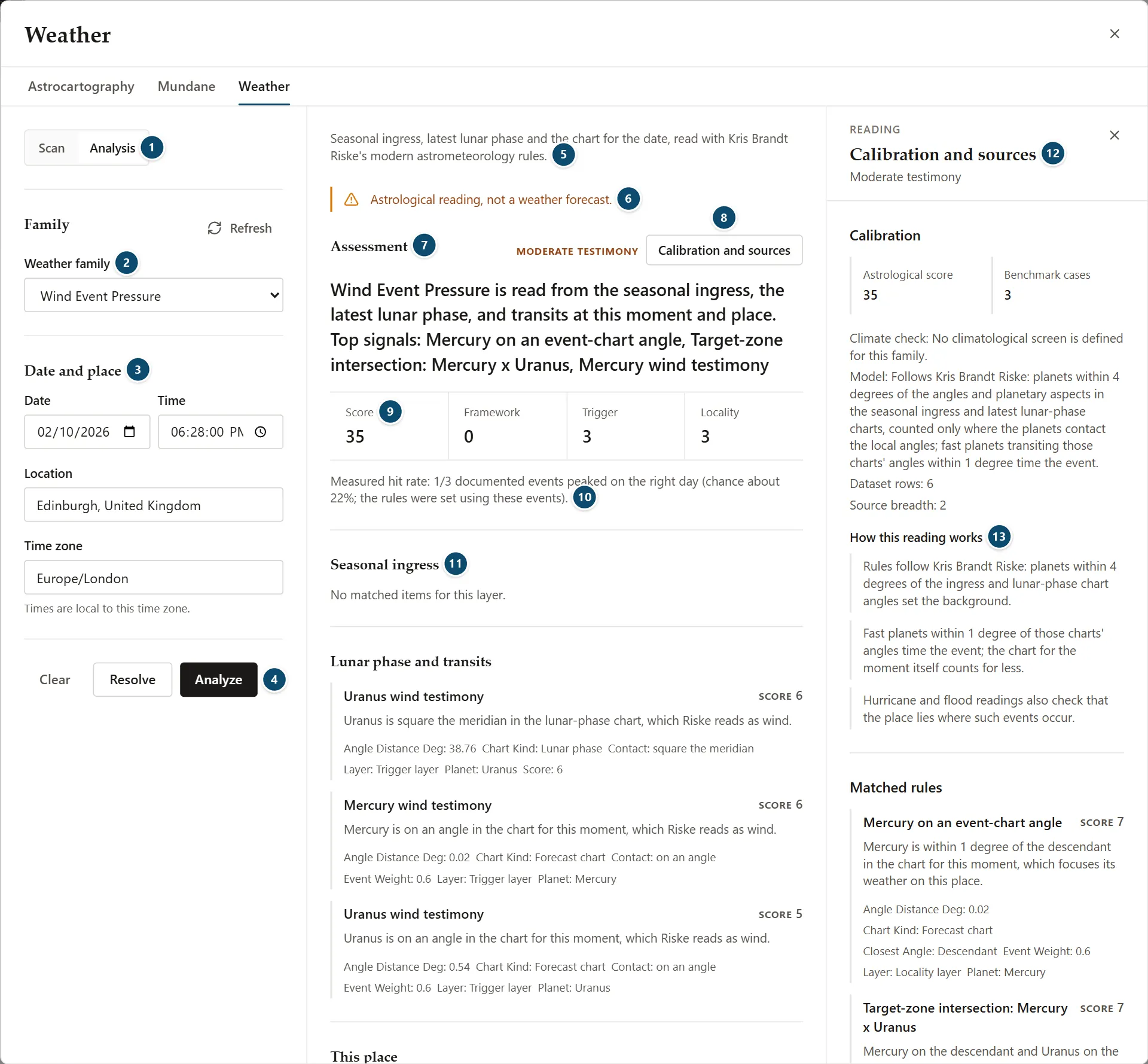
- Scan or Analysis
- Weather family
- Date and place
- Clear, Resolve and Analyze
- What the analysis reads
- The notice
- Assessment, with its reading
- Calibration and sources
- Score, Framework, Trigger and Locality
- Measured hit rate
- Seasonal ingress, the first of the three sections
- Calibration
- How this reading works
Analysis reads one moment at one place. Choose the Weather family, then under Date and place set the Date, Time (to the second, if you need it), Location and Time zone; times are local to that time zone. The chart is cast for the place you type, wherever the Astro Clock is set; leave the time zone blank to use that place's own zone.
Resolve shows the chart context without a reading. Analyze adds the reading. Clear empties the date and place.
Then:
- Assessment: the reading, a summary with the top signals, the Score, and how many items matched in the Framework, Trigger and Locality sections
- Measured hit rate: for example, how many documented events peaked on the right day and the chance rate. The window adds that the rules were set using these events.
- Seasonal ingress, Lunar phase and transits and This place: each matched item with its score and details, such as the planet, the chart it was found in and the orb in degrees, or "No matched items for this layer."
- Charts read: the family, chart time, location and time zone, the event chart, the seasonal ingress and the latest lunar phase
Calibration And Sources
Click Calibration and sources to open them in the side inspector:
- Calibration: the Astrological score and Benchmark cases; the Climate check; the model; dataset rows and source breadth
- How this reading works: three short lines on the method
- Matched rules, Doctrine sources and Doctrine notes
How this reading works says that:
- the rules follow Kris Brandt Riske, with planets within 4° of the ingress and lunar-phase chart angles setting the background
- fast planets within 1° of those charts' angles time the event, and the chart for the moment itself counts for less
- hurricane and flood readings also check that the place lies where such events occur
What Weather Can And Can't Tell You
- It reads charts by astrometeorology rules. It is not a weather forecast, watch or warning, and it isn't a guide to safety decisions: use your national weather service.
- Readings describe astrological testimony. A share of the top score only compares results within one scan.
- Measured hit rates come from a small number of documented events, which were also used to set the rules.
- The reading is for one place at a time; there is no weather map.
Practical Workflow
- Open Weather from the Places group.
- Choose a weather family.
- Choose Specific place and enter a place, or choose Region and pick one.
- Set the time window, then click Run scan.
- Read the Matrix or Dates view, and select a place or date for the side inspector.
- Click Read in Analysis on a date, or switch to Analysis, to read one moment in full and check its calibration and sources.
Notes
- No saved chart is needed.
- Scan and Analysis have separate settings, and both keep them when you switch between the two.
- A scan covers at most 31 days and 186 place-days.
- The reading is not a weather forecast, watch or warning.