
Before You Start
In Astro Clock, click Mundane in the Places group of the Tools bar. Astrocartography, Mundane and Weather share one window with three tabs; close it with the close button or press Escape.
- Mundane doesn't need a saved chart. It reads a registered national chart, or a chart you enter yourself.
- It has two modes: Scan, which opens first, and Analysis.
- Every result sits under one short notice: "Astrological reading, not a prediction."
Screen At A Glance
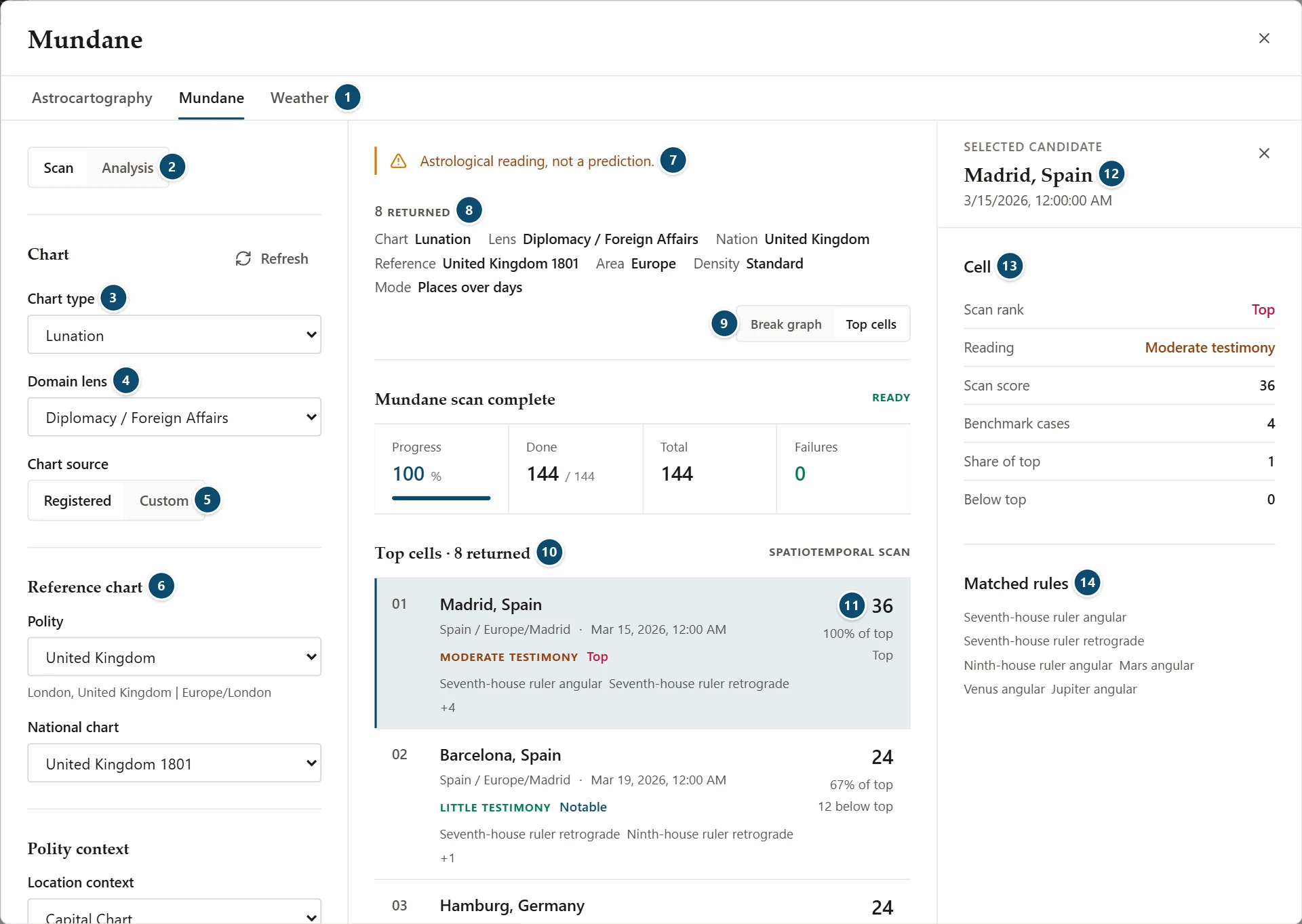
- Astrocartography, Mundane and Weather tabs
- Scan or Analysis
- Chart type
- Domain lens
- Chart source: Registered or Custom
- Reference chart: Polity and National chart
- The notice: "Astrological reading, not a prediction."
- Scan summary: results returned, chart, lens, nation, reference, area, density and mode
- Break graph or Top cells
- Top cells
- A top cell's score, its share of the top score and how far it sits below the top
- Side inspector for the selected cell
- Cell
- Matched rules
The window has three parts: the setup column on the left, the results in the middle, and a side inspector on the right that opens when you select a result. Close the inspector with its own close button, or click the selected result again.
Choosing The Chart
The Chart panel sets what is read:
- Chart type: Aries Ingress, Lunation, Eclipse or War Event. Analysis also offers National Chart.
- Domain lens: the question the chart is read for, such as Regime Stability, Finance / Economy, Trade / Commerce, Public Health or Diplomacy / Foreign Affairs. The list puts the Preferred lenses for the chart type first and Other supported lenses after them. Choosing a chart type selects its own preferred lens (Aries Ingress opens on Regime Stability, War Event on War Outbreak); after that the lens stays as you set it until you change chart type again.
- Chart source: Registered or Custom.
With Registered, choose the country under Reference chart:
- Polity, with its capital and time zone shown underneath
- National chart: leave it on Chart in force on the date and the app picks the polity's chart that was valid then (for Germany in 2026, today's Federal Republic chart, not the 1871 Empire); or choose a registered chart yourself
With Custom, enter your own reference chart: Polity name, Chart name (optional), Date, Time, Location and Time zone. The fields are filled from the polity once when you choose it; a field you clear stays clear.
When a chart has no place of its own, it is cast at the polity's capital in the capital's time zone. A War Event for Ukraine with no event location is cast for Kyiv, wherever the Astro Clock is set.
Polity context (in Analysis, Context overrides) sets the Location context, such as Capital Chart, and an optional Visibility scope.
Running A Scan
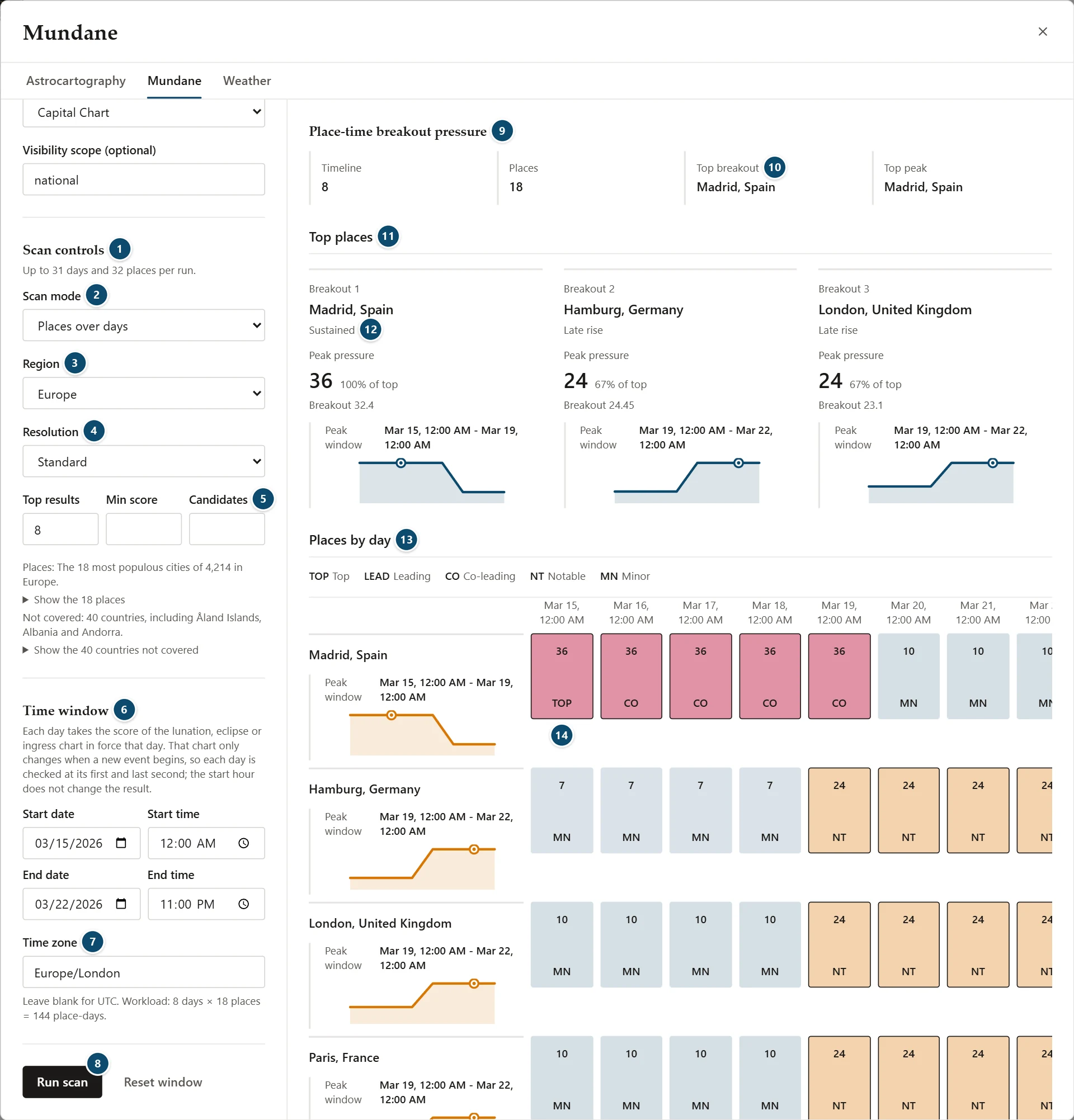
- Scan controls, with the mode's limit
- Scan mode
- Region
- Resolution
- Top results, Min score and Candidates
- Time window
- Time zone, with the estimated workload
- Run scan
- Place-time breakout pressure
- Top breakout and Top peak
- Top places
- How the place's pressure develops
- Places by day
- A day's score and scan rank
Scan mode decides what the scan covers:
- Places at one time: one moment across many places. Set the date, time and time zone under Fixed event anchor.
- Places over days: places and days together. Set a start and end under Time window.
- Long range: a longer window with fewer places, sampled less often; it runs in the background.
Scan controls shows the limit of the chosen mode, for example "Up to 31 days and 32 places per run." The other controls are:
- Region: from Global to a continent or a smaller area such as Eastern Europe or East Asia
- Resolution: Coarse, Standard, Fine or Ultra
- Top results: how many results to return
- Min score and Candidates (both optional)
Below them, the window says which places the scan covers, for example "The 18 most populous cities of 4,214 in Europe", and which countries those places leave out. Show the 18 places lists them.
Under Time window, the window explains how each day is scored. For Lunation, Eclipse and Aries Ingress, each day takes the score of the chart in force that day, checked at its first and last second. For War Event, each local day is scored at its strongest moment, on an hourly grid plus the exact times planets cross the angles. Either way, the start hour doesn't change the result. Leave Time zone blank for UTC; below it the window shows the workload, for example "8 days × 18 places = 144 place-days."
Click Run scan. A progress panel shows how many place-days are done, the total and any failures; Cancel scan stops a run, and the panel then reads Cancelled. Reset window clears the dates.
You can switch to Analysis and back while a scan runs: the scan keeps going and keeps its settings and results.
Reading Scan Results
A summary above the results gives the number of results returned, then repeats the chart, lens, nation, reference chart, area, density and mode.
A Places over days scan has two views:
- Break graph: how pressure moves across places and days
- Top cells: the ranked place-and-day results
A Places at one time scan covers one moment, so it shows Top cells only.
Top Cells
Each top cell shows:
- its rank, the place, its country and time zone, and the date
- a reading, such as Little testimony or Moderate testimony
- its scan rank: Top, Leading, Co-leading, Notable or Minor
- the first matched rules
- the scan score, its share of the top score, and how far it is below the top
The reading describes how much testimony the chart shows. The scan rank only compares the result with the others in the same scan.
Break Graph
Place-time breakout pressure opens with the number of days and places, the Top breakout and the Top peak. Below it:
- Top places: the three leading places, each with how its pressure develops (Early break, Late rise, Sustained or Quiet), its peak pressure and share of the top, its Breakout value and a small graph of its peak window
- Places by day: one row per place and one column per day, with each day's score and a scan-rank code (TOP, LEAD, CO, NT or MN), explained in the legend above the grid
The Side Inspector
Select a top cell to open Selected candidate:
- Cell: Scan rank, Reading, Scan score, Benchmark cases, Strongest moment, Share of top and Below top
- Matched rules
In Break graph, select a place to open Selected breakout place, with its Peak pressure, Breakout, Kind and Peak shape.
About This Scan
Below the results, About this scan has two panels:
- Measured performance: for War Event scans, how many hindcasts passed and what chance alone would give; the rules were set using these cases. For the other chart types it says "No scan hindcast exists for this chart type." A note repeats how each day is scored.
- Research scope: the region, resolution, candidates, days, evaluated place-days, places and top cells
Analysis Mode
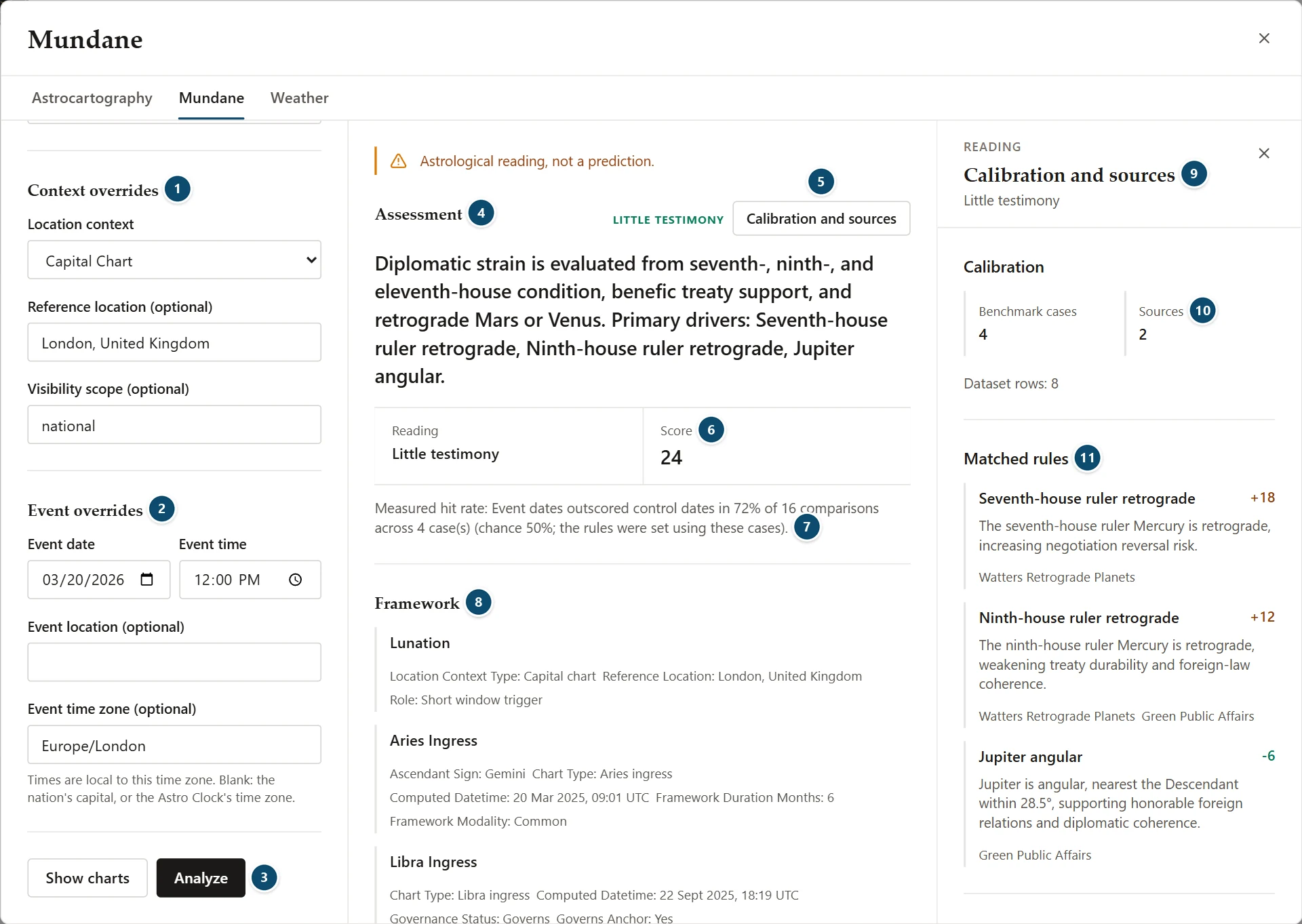
- Context overrides
- Event overrides
- Show charts and Analyze
- Assessment, with its reading
- Calibration and sources
- Reading and Score
- Measured hit rate
- Framework, the first of the reading's sections
- Side inspector: Calibration and sources
- Benchmark cases and Sources
- Matched rules, with their weights
Analysis reads one date in full. Below the chart setup:
- Context overrides: Location context, Reference location (optional) and Visibility scope (optional)
- Event overrides: Event date, Event time, Event location (optional) and Event time zone (optional). Times are local to that time zone. Left blank, the time zone is the polity capital's, or the Astro Clock's when no polity is chosen.
Show charts shows the chart stack without a reading. Analyze adds the reading:
- Assessment: the reading, a summary of what was weighed and its main drivers, and the Score
- Measured hit rate: for example, event dates outscoring control dates in a share of comparisons across a few cases, with the chance rate. The window adds that the rules were set using these cases.
- Framework, Triggers and Activations: the items each section found, such as the governing ingress, the preceding lunation or an angularity check, each with its details
- Domain notes
- Chart stack and frame: the chart type, domain, polity, location context, reference chart and event time, the primary chart, and signal cards such as the governing ingress, the ingress schedule, the Lord of the Year, eclipse visibility and Mars
How The Charts Are Read
Mundane follows the traditional and classic modern sources: Bonatti, Ptolemy as Raphael reads him, H. S. Green and Raphael, and Barbara Watters.
- Ingress: the sign rising at the Aries ingress decides how long that chart governs (a fixed sign the whole year, a common sign half, a movable sign a quarter), as in Bonatti.
- Lord of the Year: found in Aries ingress charts by Bonatti's order of places (the 1st, 10th, 7th, 4th, 11th, 9th, 5th and 3rd houses) and rulers (domicile, exaltation, the light of the sect, bound, triplicity). The planet must stand within 3° before a cusp or 4° after it, direct and clear of the Sun's rays. Placed in the 1st or a house of friendship (3rd, 5th, 9th, 11th) it calms the year. In the 7th it brings strife and war, in the 6th illness, and in the 12th treachery.
- Angular planets: a planet in the 1st, 4th, 7th or 10th house counts, and so does one up to 3° before the angle while still in the cadent house.
- Eclipses: the chart is cast for the exact new or full Moon. Only eclipses with visible darkening can govern; penumbral lunar eclipses are skipped. Where the eclipse can't be seen from the place, its testimony counts at half strength. Mars, Jupiter, Saturn, Uranus, Neptune or Pluto conjunct or square the eclipse degree within 1° activates it (Watters). Its duration and onset follow Raphael's reading of Ptolemy.
- Retrograde Mars and Venus (Watters): a treaty signed with Mars retrograde tends to be broken, and an aggressor tends to be defeated; with Venus retrograde, treaty talks break down or treaties are betrayed, and epidemics often begin.
- The capital city gets no extra weight: it is where a polity's chart is cast, not a reason to score it higher.
Calibration And Sources
Click Calibration and sources to open them in the side inspector:
- Calibration: Benchmark cases, Sources and dataset rows
- Matched rules: each rule with its weight and the sources behind it; a positive weight adds to the score and a negative one takes away
- Matched rule sources and Doctrine sources
- Chart type notes and Context notes
What Mundane Can And Can't Tell You
- It reads charts by the rules of mundane astrology. It is not a political, security, economic or public-health forecast, and scores are not probabilities.
- Readings describe astrological testimony. Scan ranks and shares of the top score only compare results within one scan.
- Measured hit rates come from a small number of benchmark cases, which were also used to set the rules.
- A custom reference chart is only as good as the date, time and place you enter.
Practical Workflow
- Open Mundane from the Places group.
- Choose the chart type and the domain lens.
- Choose a polity and national chart, or enter a custom chart.
- In Scan, choose the scan mode, region and dates, then click Run scan.
- Read Break graph or Top cells, and select a result for the side inspector.
- Switch to Analysis to read one date in full and check its calibration and sources.
Notes
- No saved chart is needed.
- Scan and Analysis have separate settings, and both keep them when you switch between the two.
- Changing the region, resolution or time window changes the workload; the window shows the mode's limit before you run.
- Scores are not probabilities.