 Vox Stella
When people search for an astrocartography app, they often start with the wrong question. They ask whether the software can draw planetary lines on a world map. That matters, but it is only the first layer. The better question is whether the tool helps you turn a broad location question into a structured comparison you can actually use.
That distinction matters if you are evaluating astrocartography software or relocation astrology software. Most real decisions are not about one line or one city in isolation. They are about choosing between options: one city versus another, one kind of move versus another, or one short-term trip versus a more serious relocation question. If your search starts with phrases like where should I move astrology or best places to live astrocartography, the software should help you narrow the problem, not turn it into a vague promise.
For the broader background, start with What Is Relocation Astrology? How to Use an Astrocartography Map to Compare Cities. This article is narrower. It is about workflow: map exploration, shortlist building, city-level inspection, side-by-side comparison, and the deeper layers that matter only after a place has earned a closer look.
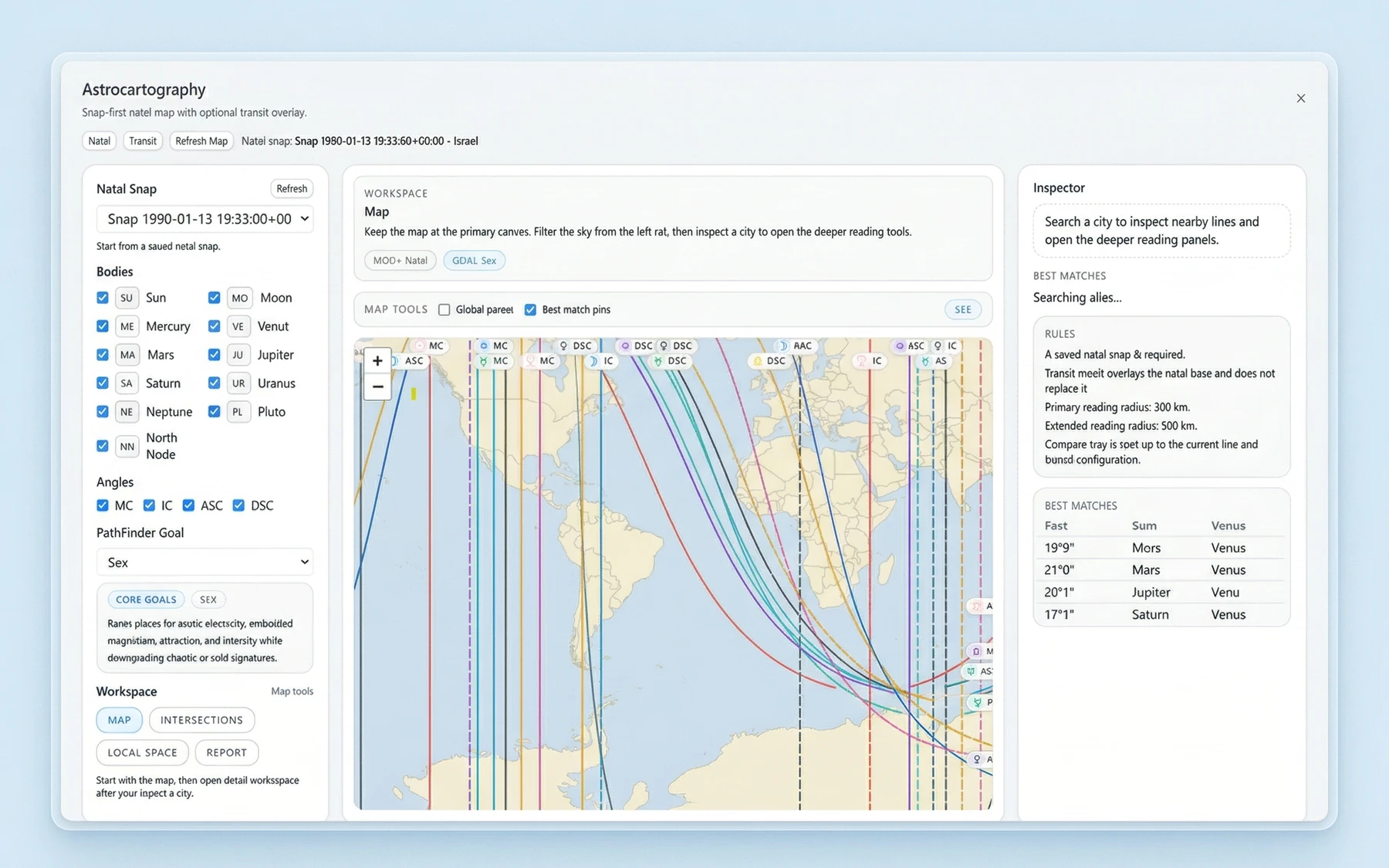
A useful astrocartography app should do more than draw lines
An astrocartography map is valuable because it gives you range. You can scan the world quickly and notice where certain lines gather, where a region becomes interesting, or where a city you had not considered suddenly deserves a second look. That first pass turns a huge planet into a more manageable field of possibilities.
But map visibility alone is not enough. A line crossing a region does not answer a decision by itself. It does not tell you whether two candidate cities should be treated as similar or different, or how a home question differs from a career question. It does not help much when several places are already on the table and you need to sort them honestly.
This is why compare cities astrology is a better frame than reading one line in isolation. A serious astrocartography app should help you move from "something interesting is here" to "how do these specific places stack up against each other?" That is where software becomes decision support instead of visual reference.
Map exploration and city-level comparison are different jobs
What map exploration is good for
Map exploration is broad by design. It helps you browse the world map, inspect planetary lines, and get oriented. This stage is good for spotting regions worth attention, eliminating places that do not look compelling, and forming an initial shortlist.
It is also the right stage for curiosity. You may begin with a continent, a few countries, or a loose question such as whether to stay close to home or look farther away. A map-first workflow supports that kind of open search because it lets you begin wide before committing to a specific city.
What city-level inspection adds
City-level inspection is where the question becomes practical. Once you already have candidates, you need more than a glance at the map. You need to inspect each city in more detail and understand why it belongs on the shortlist at all.
This matters because people do not relocate to abstract lines. They choose cities. They compare routines, neighborhoods, work options, relationships, and the quality of daily life. The map tells you where to look. City inspection helps you decide what deserves serious consideration.
Why side-by-side comparison changes the decision
Side-by-side comparison is the step that turns browsing into evaluation. Instead of asking whether one city looks interesting in isolation, you can compare multiple cities under the same question and see which ones hold up better.
That matters for location astrology and relocation astrology because goals are rarely identical. A move centered on home life is not the same as a move centered on love, career, or money. A short travel plan is not the same as a permanent relocation. Comparison helps keep those questions honest and stops one highlighted line from becoming the whole answer.
Why comparison matters more than reading one line in isolation
A single line can be meaningful, but it is not the decision. In practice, people want to know which city is stronger for a specific purpose, or which option feels more balanced once supportive and cautionary factors are held together. That is a different question from "What does this one line mean?"
This is also where goal-based ranking becomes useful. If software supports practical categories such as home, love, career, and money, it helps frame the comparison around the decision you are actually making. That does not turn the result into certainty, and it does not mean every person would receive the same answer. It simply keeps the evaluation tied to a concrete goal instead of a vague impression.
For readers exploring relocation tools, this is one of the clearest signs of serious software intent. The point is not to find a single perfect place and stop thinking. The point is to compare plausible options in a more structured way, then review the tradeoffs with clearer language.
A map-first workflow turns a broad question into a usable shortlist
The best way to evaluate an astrocartography app is to follow the workflow it encourages.
- Start with map exploration. Browse the world map and inspect planetary lines broadly enough to see where attention naturally gathers.
- Move to shortlist creation. Once a few cities or regions look worth consideration, narrow the field. This is the moment where a sprawling question becomes manageable.
- Inspect cities in more detail. A shortlisted city should earn its place through closer review, not just because it sits near an eye-catching line.
- Compare cities side by side. Put candidate cities against each other under the same decision frame. This is where software becomes useful, not just interesting.
- Go deeper only after that. Deeper layers should refine a shortlist, not replace the shortlist.
That order matters because it matches the real problem. First you scan. Then you narrow. Then you compare. Then you inspect more deeply where the effort is justified. If you want to see how the feature stack supports that sequence, the Astrocartography, local space, and parans features page shows the deeper toolset, while the Vox Stella desktop astrology app page shows how Astrocartography fits the wider platform.
Example: turning a vague travel question into a structured shortlist
To make that workflow concrete, here is a travel-oriented internal backend example. The sample chart is an arbitrary demonstration chart for content, not a real user case study, and it should be read as an illustration of workflow rather than proof.
Sample chart used for this illustration
- Sample chart datetime:
1988-05-23 09:15 - Timezone:
America/New_York - Sample birth location:
New York, New York, USA - Usage note: this is an arbitrary demonstration chart for content, not a real user case study.
In this sample travel-oriented run, the shortlist was limited to three leisure candidates:
- Barcelona, Spain
- Lisbon, Portugal
- Rio de Janeiro, Brazil
Returned ranking
-
Barcelona, Spain
Score:43| Raw score:5.903| Lead line:Mercury MC
Relocation headline: Relocation is led by Mercury MC, Venus MC.
Support notes: Beliefs 100 / 100, Restoration 100 / 100, Visibility 67 / 100.
Caution notes: Malefic Pressure 25 / 100, Health Risk 25 / 100. -
Lisbon, Portugal
Score:43| Raw score:5.903| Lead line:Sun MC
Relocation headline: Relocation is led by Mercury MC, Venus MC.
Support notes: Beliefs 100 / 100, Restoration 100 / 100, Visibility 67 / 100.
Caution notes: Malefic Pressure 25 / 100, Health Risk 25 / 100. -
Rio de Janeiro, Brazil
Score:35| Raw score:2.740| Lead line:Jupiter MC
Relocation headline: Relocation is led by Sun MC, Jupiter MC.
Support notes: Career Status 100 / 100, Personal Growth 75 / 100, Body Presence 75 / 100.
Caution notes: Malefic Pressure 50 / 100, Health Risk 50 / 100.
What does this example show? First, it shows the value of working from a shortlist instead of a blank globe. Second, it shows how a vague travel question can be turned into a returned ranking that is easier to discuss. In this sample run, Barcelona and Lisbon surfaced as the strongest options, while Rio landed lower.
Just as important, the example shows why comparison is more useful than reading one line in isolation. Each city comes back with a lead line, a headline, supporting notes, and caution notes. You do not need to treat that as scientific proof to see the practical advantage. It gives you a structure for comparison, and that structure is what makes software usable.
Deeper layers are most useful after the first comparison
A good astrocartography workflow does not end with a shortlist, but it also does not start with the deepest layer available. Once a city has earned a closer look, deeper inspection layers become more valuable.
This is where local space astrology and parans astrology belong. They add depth after the first pass, not instead of it. The same goes for report-style interpretation. Once a city has already proven interesting, a concise interpretive layer can help you understand the location in a more rounded way.
For software evaluation, this sequencing matters. Deeper layers are most useful when they support comparison, refinement, and final review. That is also why it helps to compare cities side by side before getting lost in every possible detail.
Why Vox Stella fits this kind of astrocartography workflow
Vox Stella is a desktop astrology app, and one of its features is Astrocartography. For readers evaluating astrocartography software, the relevant point is not just that it shows planetary lines on a world map. The more important point is that the feature is map-first and built around structured comparison.
You can inspect planetary lines on a world map, inspect cities in more detail, compare cities side by side, and go deeper through layers such as local space, parans, and a compact report-style interpretation. The software also supports goal-based location ranking for practical categories such as home, love, career, and money.
That makes Vox Stella more useful than a map viewed as a static image. It supports a workflow. You start wide, narrow to a shortlist, inspect locations more carefully, compare them directly, and then use deeper layers where they add value. For relocation questions, that helps frame the decision. For travel planning, it offers a structured way to compare options without pretending the result is absolute certainty.
Final thoughts
If you are comparing an astrocartography app, do not stop at the question of whether it can show lines. Ask whether it helps you compare cities. Ask whether it separates map exploration from city-level evaluation. Ask whether it supports a shortlist, a side-by-side comparison, and deeper inspection layers that matter at the right time.
That is the difference between an astrocartography map as a visual curiosity and astrocartography software as a practical tool. The strongest tools do not promise the one objectively best city. They help you work through a real decision with more structure and better comparisons.
For readers evaluating Vox Stella, that is the core value to watch for. It is a map-first astrocartography app for people who want to move from broad location questions toward a more grounded comparison for home, love, career, and travel planning.
FAQ
What makes an astrocartography app useful?
A useful astrocartography app does more than display planetary lines. It should help you move from broad map exploration to a shortlist, city-level inspection, side-by-side comparison, and deeper review when needed.
Is an astrocartography map enough to compare cities?
Usually not. An astrocartography map is excellent for broad exploration, but real decisions are usually made by comparing specific cities rather than reading one line in isolation.
What is the difference between map exploration and city-level comparison?
Map exploration helps you scan broadly and spot promising regions. City-level comparison is where you inspect specific locations in more detail and weigh them against each other for a real decision.
Can relocation astrology software help with home, love, career, or money questions?
It can help structure those questions more clearly. Software that supports goal-based location ranking can make comparison more practical, but it should be treated as decision support rather than certainty.
Can astrocartography be used for travel planning?
Yes, as a comparative planning tool. It can help you look at a shortlist of destinations in a more structured way, without implying that one place is universally best.
What are local space astrology and parans astrology in this context?
They are deeper inspection layers that can add detail after a shortlist already exists. They are most useful for refining a comparison, not replacing the first pass.
Can astrocartography tell me the one best place to live?
No serious tool should promise that. The better use of astrocartography is to compare options, think through tradeoffs, and make a more informed decision.