 Vox Stella
If you are searching for an electional astrology app, you usually want one thing: a short list of workable times, not a wall of theory. Vox Stella's Election feature is built for exactly that. You choose the event type, date range, location, and availability, then the app scans the window and returns ranked moments with clear pros and cautions.
That matters because most people are not timing only one type of event. They want help with a wedding date, a business launch, a contract signing, a trip, a conception window, or a publication push. Vox Stella does not treat all of those as the same generic "lucky date" problem. It gives each one its own model, filters, and scoring logic, then lets you review the strongest time slots in a workflow that is fast enough for everyday use.
If you want the broader background first, read What Is Electional Astrology and Why Is It Used?. If you want the product workflow, keep reading.
What Is an Electional Astrology App?
An electional astrology app helps you find auspicious dates and times for important actions. Instead of manually checking the Moon, angles, rulers, retrogrades, and daily availability one chart at a time, the software scans a defined range and ranks the strongest windows for your goal.
That is why search terms like best wedding date astrology app, business launch astrology app, auspicious date finder, and contract signing astrology all point to the same need: people want timing help that is specific, fast, and readable. Vox Stella's Election feature is positioned exactly there. It turns classical timing logic into a shortlist you can act on.
How Vox Stella's Election Feature Works
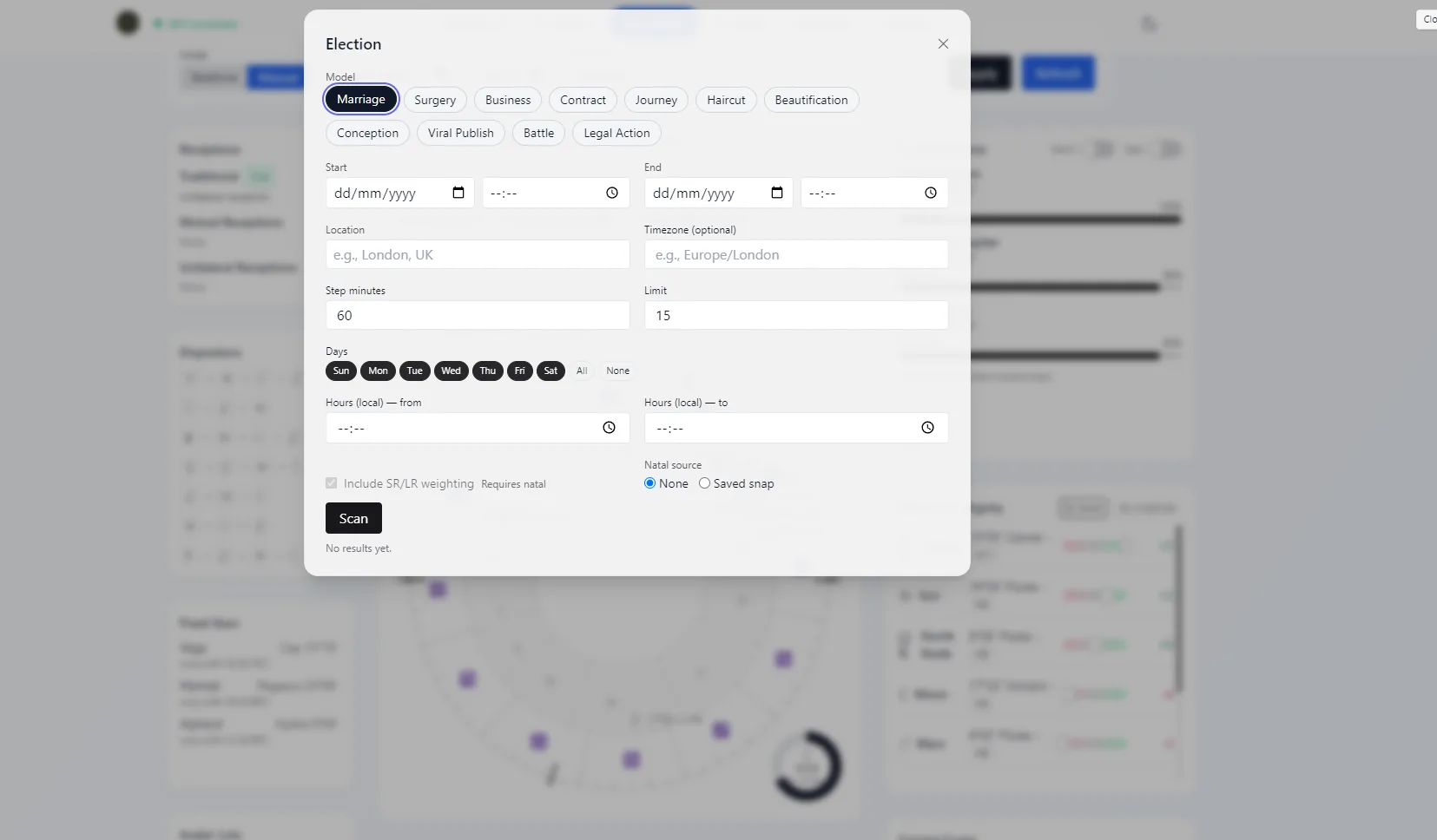
- Choose the model. The feature supports 11 models: Marriage, Surgery, Business, Contract, Journey, Haircut, Beautification, Conception, Viral Publish, Battle, and Legal Action.
- Define the real-world window. Enter a start and end date, the location, and an optional timezone. This matters because strong astrology still has to fit the city and clock that the event will actually use.
- Filter for workable availability. Set step minutes, result limit, weekdays, and local hours. That lets you scan only weekends, only office hours, or only the slots your team can actually use.
- Add a natal source if you want personalization. You can run the feature without birth data, or select a saved snap to apply natal overlays and optional SR/LR weighting.
- Run the scan. The app streams progress live, so long date ranges do not feel blind.
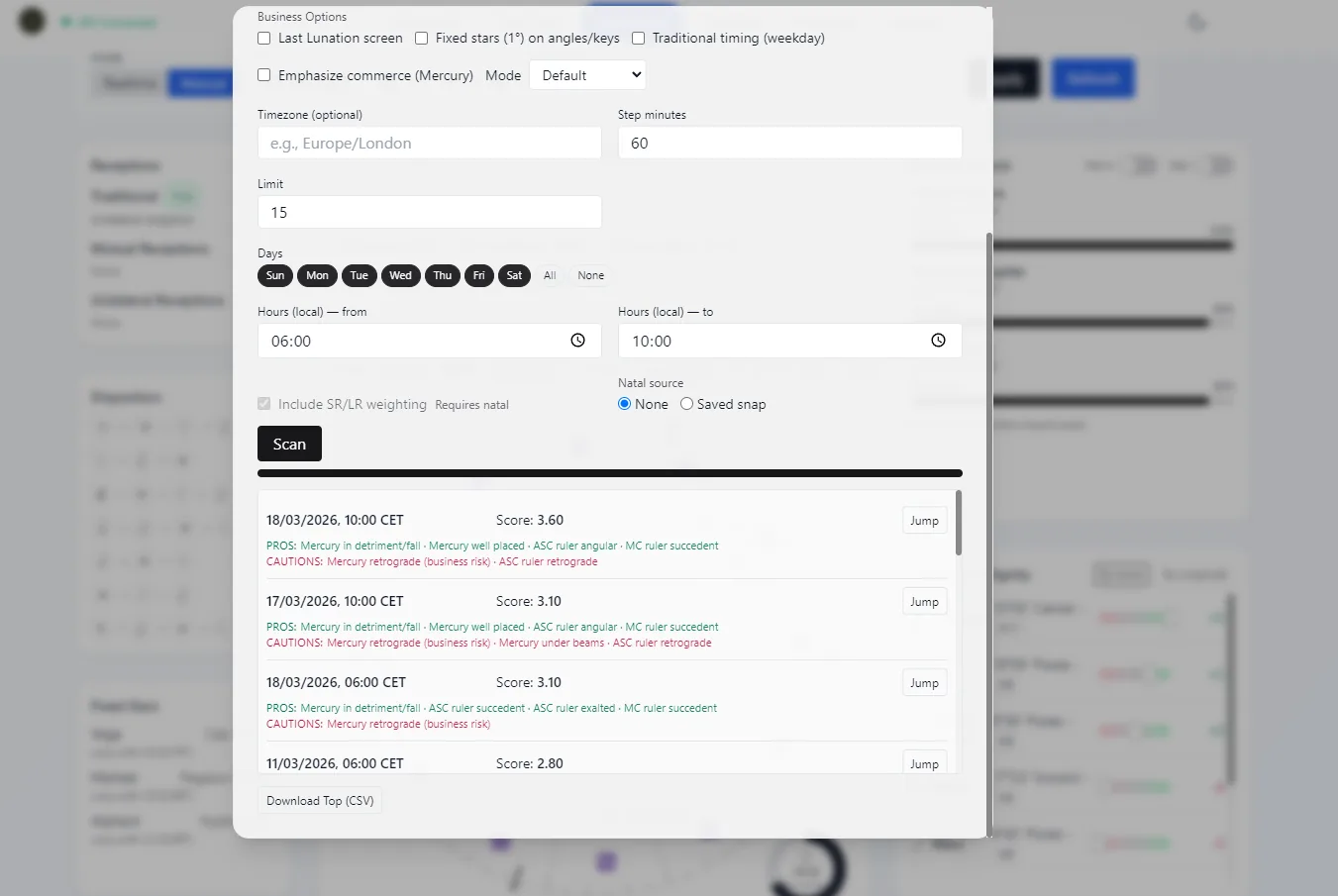
- Review the ranked shortlist. Each top result includes a score, short pros, short cautions, a Jump action back into Astro Clock, and CSV export for sharing.
This workflow is why the feature feels more like usable electional astrology software than a novelty widget. It is built for decision-making, not just chart display.
Why Vox Stella Is More Useful Than a Generic Auspicious Date Finder
Many astrology tools stop at "here is a good day." Vox Stella goes further and handles the constraints that make a timing tool practical:
- Model-specific logic: business launches, marriage elections, surgery timing, and contract elections are not scored as if they were identical events.
- Calendar realism: weekday and local-hour filters prevent impossible recommendations.
- Configurable scan density: step minutes let you search broad or fine-grained windows.
- Optional natal depth: saved snaps can personalize the scan without making natal data mandatory.
- Readable output: the app surfaces pros and cautions instead of leaving you to reverse-engineer the score.
- Actionable export: you can jump straight into chart review or download the shortlist as CSV.
That last point matters for teams. A wedding planner, founder, lawyer, or content manager often needs to share two or three candidate times quickly. The exportable shortlist makes the feature much easier to use in real planning conversations.
The 11 Election Models, Mapped to Real Search Intent
One reason the Election feature is easy to market is that it covers multiple high-intent searches without stretching the product. The supported models line up with what people already search for:
- Marriage: best wedding date astrology app, choose wedding date by astrology, auspicious wedding time.
- Business: business launch astrology app, best day to launch a business, astrology for startup launch.
- Contract: contract signing astrology, best day to sign a contract, electional astrology for agreements.
- Journey: travel astrology timing, best day to travel astrology, auspicious departure date.
- Surgery: surgery election astrology, best date for elective procedure astrology.
- Conception: conception timing astrology, fertile date election astrology.
- Viral Publish: viral post timing astrology, best day to publish content astrology.
- Legal Action: legal filing astrology, best day to file a lawsuit astrology.
- Haircut and Beautification: haircut astrology dates, best day for cosmetic treatment astrology.
- Battle: strategic timing for conflict scenarios where electional posture matters.
Because the feature is structured by model, the product page can speak broadly while the blog can target specific long-tail searches one by one. That is already visible in the existing posts for marriage, business launches, and viral publishing.
How the Business Launch Workflow Shows the Feature's Depth
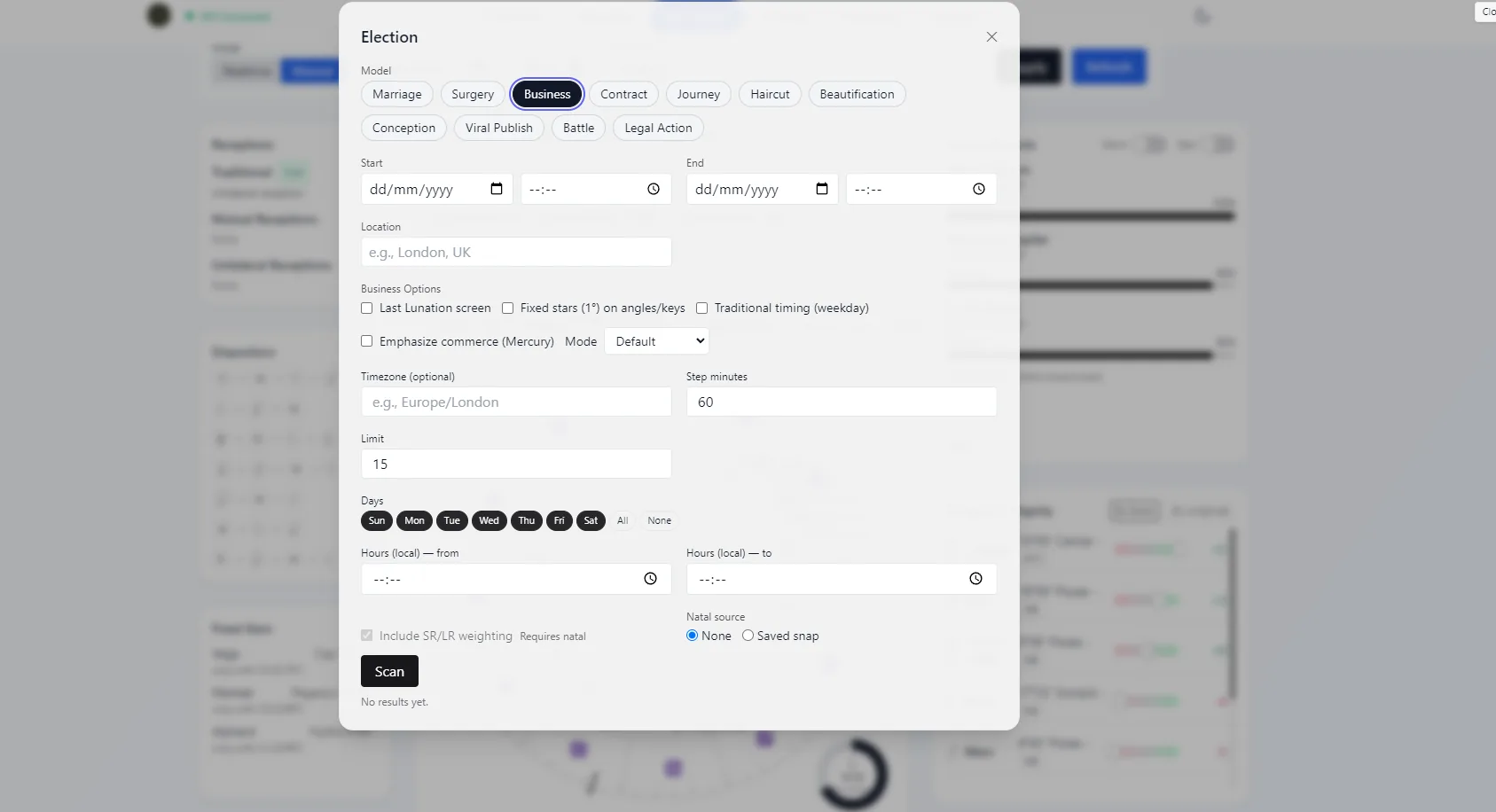
The Business model is a good example of why this is not a thin wrapper around a single score. In addition to the standard date, place, timezone, weekday, and hour filters, the interface exposes business-specific controls such as Last Lunation screen, Fixed stars, Traditional timing (weekday), Emphasize commerce (Mercury), and a Mode selector with Default, Conservative, and Growth behavior.
That gives founders and operators a better fit for real launch decisions. If you are timing a quiet release or internal rollout, one setup may suit you better. If you are timing a public launch, PR push, or revenue event, another setup may rank differently. For a deeper business use case, see Election Astrology for Business Launch: The Complete Guide.
From Scan to Decision: What the Results Actually Look Like
After the scan, Vox Stella returns a ranked list of candidate times. Each result shows a local timestamp, score, short pros, and short cautions. If one slot looks promising, you can use Jump to move back into chart view for deeper inspection. If you need to send the shortlist to someone else, you can export the top results to CSV.
This is one of the strongest conversion points for the feature. Searchers looking for an electional astrology app are often comparing "manual chart work" against "a tool that saves time." The ranked list makes that difference obvious immediately.
Popular Use Cases People Search For
1. Wedding Date Astrology App
If your main search is some version of best wedding date astrology app, the Marriage model is the entry point. You can restrict the search to weekends, venue-friendly hours, and your actual city, then review a ranked shortlist instead of testing charts manually. For the consolidated wedding guide, see Wedding Election Astrology: How to Choose a Better Wedding Date with Alpha vs Beta.
2. Business Launch Astrology App
If you are launching a company, feature, campaign, or product update, the Business model gives you more control than a generic election calculator. You can shape the scan around office hours, add Mercury emphasis, and inspect the shortlist in a workflow that is friendly to founders, operators, and agencies.
3. Contract Signing Astrology
The Contract model lets you work with agreement-specific settings such as fixed-Asc preference, Saturn binding allowance, minimum days after Mercury turns direct, and context like renew, amend, or finalize. That makes it useful for searches like best day to sign a contract astrology and contract signing astrology.
4. Travel, Publishing, and Conception Timing
The Journey, Viral Publish, and Conception models extend the same core workflow into high-intent areas that often lead to organic traffic. For content marketers and creators, Viral Publish is especially strong because it turns electional timing into a practical publishing calendar. See Harnessing Astrological Elections to Boost Your Social Media Virality for that use case.
Who the Feature Is For
- Astrologers who want to scan windows faster without giving up chart-level review.
- Beginners who need clear reasons, not just symbols and scores.
- Wedding planners and couples who need timing that respects venue and family logistics.
- Founders and operators who want to pressure-test launch windows before going live.
- Creators and marketers who want a more deliberate publishing rhythm.
In other words, the Election feature works as both a professional aid and a beginner-friendly auspicious dates app. That is a valuable mix for SEO because it serves expert and non-expert search intent on the same page.
What Makes the Election Feature Easy to Recommend
From a product-marketing standpoint, the feature has a simple promise: scan your real window, rank the best times, and explain the shortlist. The screenshots above support that promise directly. Users can see the model selector, the business controls, and the ranked scan results without needing a long setup tutorial.
That combination is what makes this post useful for search. It answers the high-intent query electional astrology app, then proves that the feature is broad, practical, and already implemented.
Ready to try it? Explore the Election feature page, browse the broader features overview, or download Vox Stella and start scanning your own marriage, business, contract, journey, or publishing windows.
FAQ
Can I use the Election feature without birth data?
Yes. Birth data is optional. You can run the scan with only the event details, then add a saved snap later if you want natal overlays and SR/LR weighting.
Does the score guarantee success?
No. The score is a ranking tool inside the scanned window, not a guarantee. It helps you compare options faster and then inspect the chart with more confidence.
Can I filter for weekends or business hours only?
Yes. You can filter by weekdays and local hours, which is one of the biggest reasons the feature is more useful than a generic auspicious date calculator.
Can I export the results?
Yes. The top shortlist can be downloaded as CSV, and individual results can be jumped back into Astro Clock for chart review.
Is this legal or medical advice?
No. For surgery and legal-action models, the feature is a timing aid, not a substitute for professional advice.