 Vox Stella
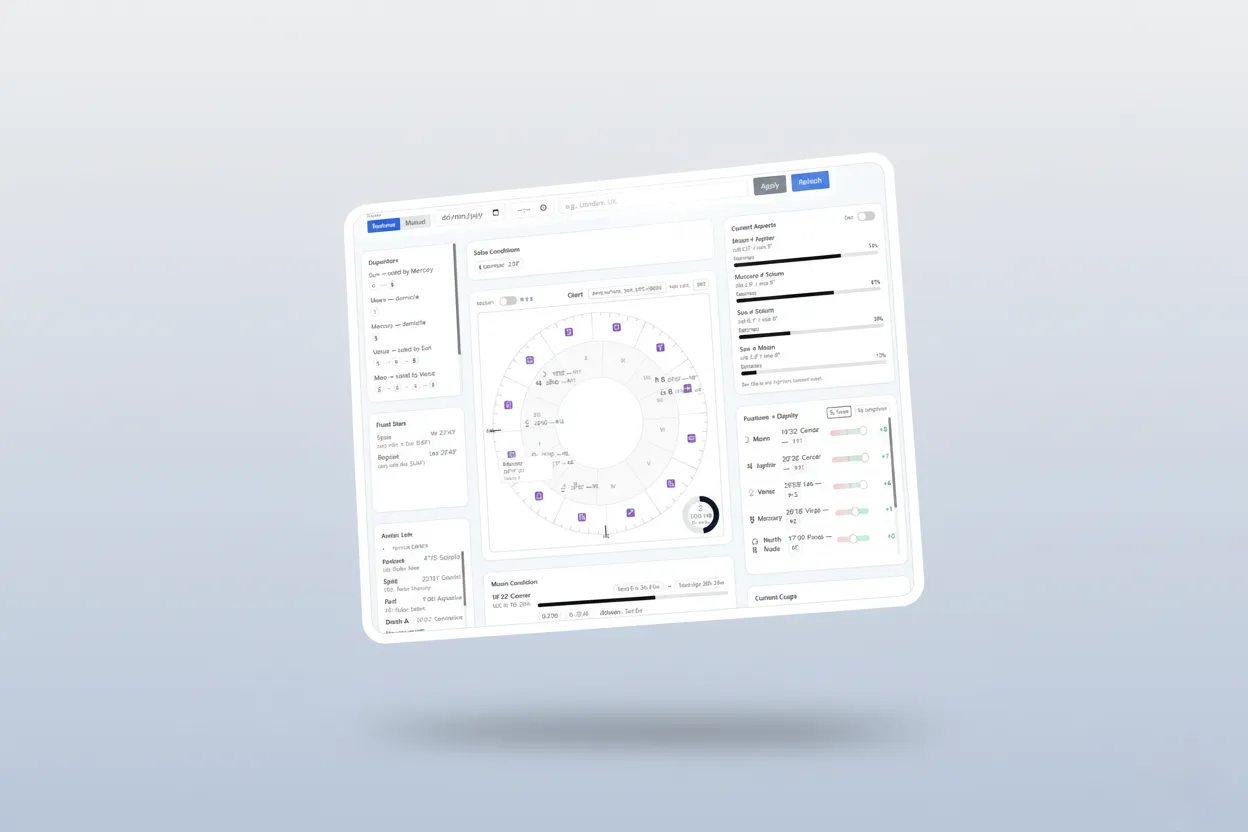
Create a professional horary chart in seconds and watch it come alive. Our new dashboard keeps your chart, aspects, and key conditions up-to-the-moment so you can read the sky as it moves - without refreshing, re-typing, or hunting through menus. It's beautifully simple, focused on what astrologers actually need, and free the moment you download the app.
Why this matters
When a question arrives, you want clarity - fast. The Live Horary Dashboard brings everything together on a single, calm screen: the chart in the center, the most important information around it, and plain-English cues to guide your reading. It quietly keeps itself current so you can stay in flow.
A chart that stays current
Think of it as a living chart. The wheel and tiles gently refresh on their own every few moments, so positions and conditions are always current. Set your location once and the dashboard takes care of the rest - local time, time zone, and daylight-saving changes are handled for you. A small chip in the header shows the active time zone (for example, Europe/London (UTC+01:00)) and a quick Edit makes it easy to switch locations.
Chart Wheel: clean, readable, and elegant
At the heart of the dashboard is our Wheel, a crisp, SVG-based chart built purely with React for smooth performance and clear readability.
- Orientation that makes sense: Ascendant on the left at 9 o'clock, counter-clockwise zodiac, house lines, and Roman numerals for houses.
- Planet labels you can read at a glance: Each body shows its glyph with a right-aligned degree-minute label and house badge. In busy areas, labels intelligently step aside so nothing overlaps.
- A gentle magnifying "glass": Hover to reveal a subtle circular lens that enlarges what's beneath - handy for tight clusters near cusps.
- Hour-of-Day ring: A small overlay shows how far through the day you are, along with the current ruling planet and local time.
The most important tiles, right where you expect them
We curated a set of tiles that keep a horary reading moving. No noise - only signal.
Current Aspects
See the top applying aspects first, ranked by closeness. Prefer working with declination? Flip a simple toggle and view parallels and antiparallels instead. Either way, you'll always see what's approaching, not what's already passed.
Positions & Dignity
A single, compact table shows each planet with its sign, exact degree, and house, plus a clear score for essential dignity. Sort by Score (default) to see the heavy hitters first or by Longitude when you want to scan the zodiac in order.
Moon Condition
Instantly check the Moon's degree and sign, whether it's Void of Course, its next aspect and next sign, and how far it's progressed through the current sign. When the Moon is void, you'll also see the duration - no mental math required.
Solar Conditions
Helpful chips call out Cazimi, Combust, and Under Beams, with simple notes on which planet is involved and how close it is. It's the Solar status you usually look up - already done.
Fixed Stars
Curious about notable stars on the angles or with luminaries? This tile lists star positions and any close conjunctions with the Sun, Moon, or house cusps, including the orb.
Dispositors
Follow the chain of rulers cleanly, planet by planet. The header tells you when there's domicile rulership or a strict mutual reception. Pills and arrows show the path - no duplicates, no loops, just a clear line.
Current Cusps
A simple table for H1 - H12 shows the degree, sign, and ruler of each house. It's everything you need for quick house work, at a glance.
Arabic Lots
Open the in-tile expander to choose formulas for Death (A/B), Poison (V1/V2), and Plane (V1/V2). You'll always see Fortune, Spirit, and Peril, each with position, house, and ruler. Switch variants without leaving the dashboard.
Controls you'll actually use
- Modern planets (Uranus, Neptune, Pluto): Turn them on or off across the wheel, positions, and aspect lists with a single toggle.
- Declination mode: Prefer parallels and antiparallels? Flip the Decl toggle in the Aspects tile to work in declination.
- Quick location edit: Tap Edit in the header to change place; the chart and all tiles sync immediately.
Designed for simplicity - and serious work
We built this to feel effortless from the first moment:
- One screen, zero clutter. The essentials of horary practice are visible without digging or menu surfing.
- Readable typography. Degrees, minutes, and house numbers are set for clarity, even in dense configurations.
- Gentle motion. Planets glide to their new spots so changes are easy to track without jarring jumps.
Perfect for "create astrology chart" moments
If you've ever typed "create astrology chart" or "horary chart" into a search bar mid-consultation, you'll appreciate how quickly this gets you from question to chart. Open the dashboard, choose your place, and you're already looking at a live astrology chart with dignity scores, current aspects, Moon condition, fixed stars, Arabic lots, and house rulers lined up for you. It's everything most readers reach for - presented cleanly and updated for the moment you're in.
Try it free today
The Live Horary Dashboard is free and ready to use as soon as you download the app. There's no trial to start, no wall to climb - just open and read the sky.
Download the app and start your next horary in seconds.
Short FAQ
Is the Live Horary Dashboard free?
Yes. It's included in the app at no cost and works immediately after download.
Can I include the modern planets?
Absolutely - use the Modern toggle to include Uranus, Neptune, and Pluto across the chart and aspect lists.
Does it handle time zones and daylight saving time automatically?
Yes. Choose your location and the dashboard uses the correct local time, including DST changes.